Free Project Tracker & Milestone Template
A project tracker template keeps deliverables, owners, target dates, RAG status stages, and critical dependencies visible on a single page so multi-week initiatives ship on time without heavyweight software. Print our free A4/US Letter milestone & RAID sheet, map your active workstreams in the builder below, or use our automated Google Sheets tracker.
Interactive Project Milestone & RAG Status Builder (Free Printable Export)
Map your project milestones, owners, timeline buffer, and top risk below, then click Print / Export My Project Sheet (PDF).
What’s in the template
- 12-Row Milestone & Deliverable Matrix: Tracks each milestone’s concrete deliverable, single accountable owner, workstream, target date, and RAG status on one page.
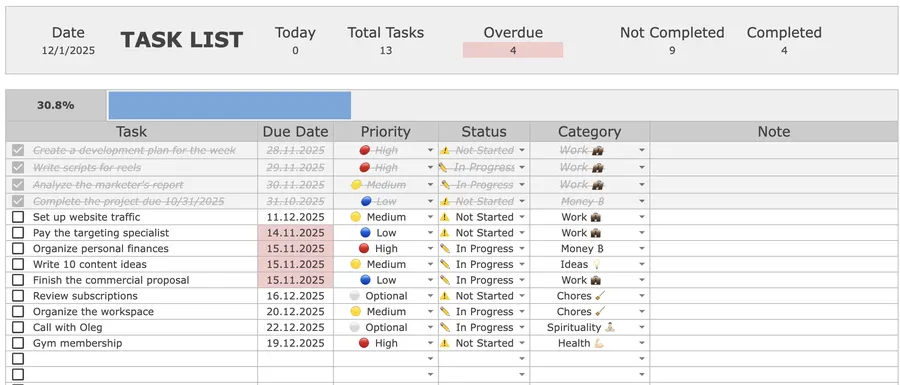
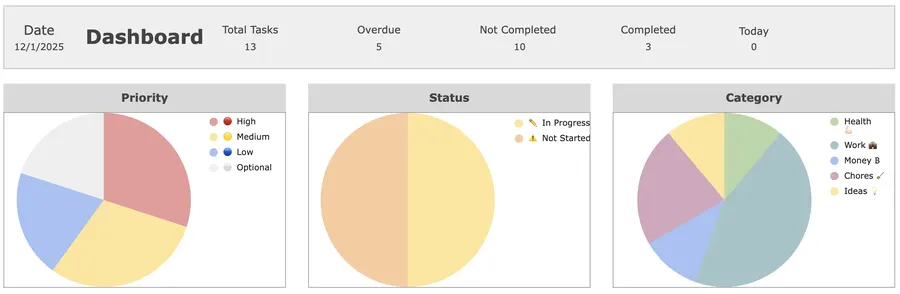
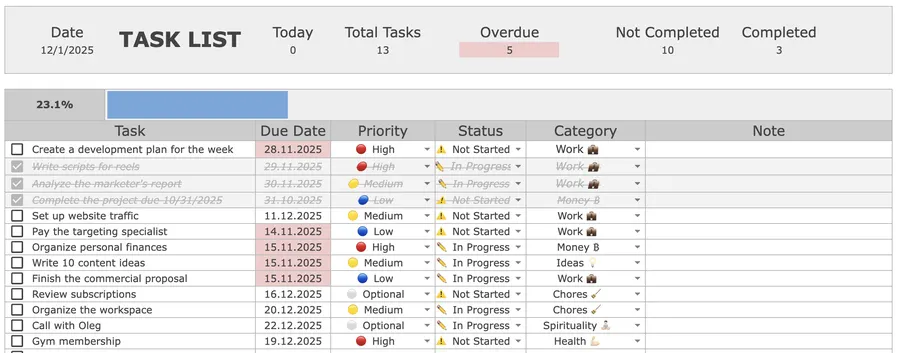
- Automatic Overdue & Status Alerts: In the Google Sheets edition, past-due deliverables highlight in red automatically while header counters tally open, overdue, and completed items.
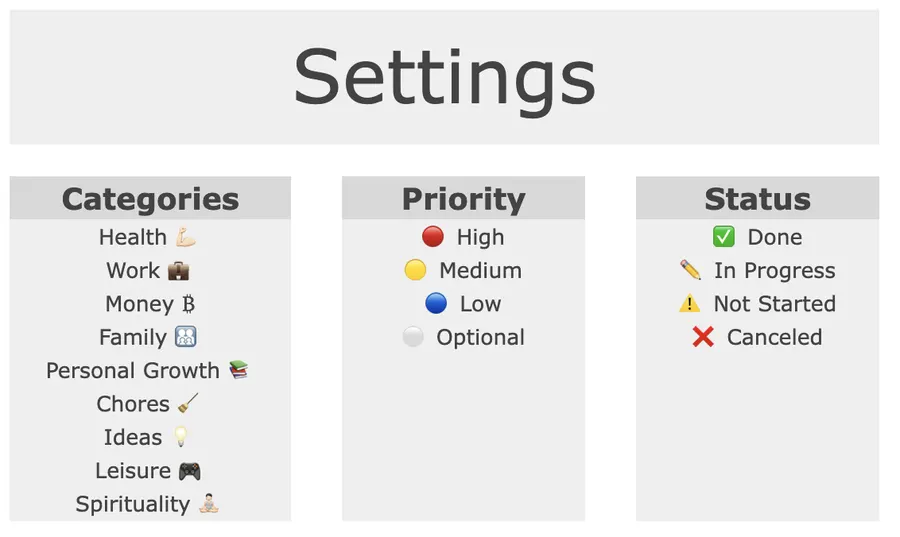
- Multi-Column Filtering by Project, Priority & Status: Slice your master backlog by workstream or priority in two clicks so weekly stand-ups stay under 15 minutes.
- Built-In RAID & Dependency Boxes: Dedicated space for critical external dependencies, pre-mortem risk mitigations, and Friday review notes.
How to run a project tracker in 15 minutes a week
- Write a single Definition of Done: Define the exact outcome and target launch date at the top of the sheet before adding task rows.
- Assign one owner per milestone: Shared ownership means no ownership. Every row gets one accountable name and a concrete target date.
- Pull active milestones into your weekly plan: Each Monday, move this week’s active milestone actions into your Weekly Planner and Daily Planner.
- Audit RAG status every Friday: Spend 15 minutes flagging any slipping dependency as Amber early enough to adjust scope or resources.
Up close

Format Comparison: Printable PDF vs. Google Sheets vs. Kanban Boards vs. Gantt Software
| Format | Best for | Setup time | Key trade-off |
|---|---|---|---|
| Printable PDF (A4 / Letter) | 1-page executive brief & Friday review | 1 min | High clarity in meetings; requires manual status updates |
| Google Sheets (Automated) | Multi-project backlog + overdue alerts | 2 min | Automatic red overdue dates, category filters, and % completion bar |
| Kanban Boards (Trello / Notion) | Visual card dragging for small teams | 5 min | Easy status columns; harder to scan 20+ milestone target dates at once |
| Enterprise Gantt Software | 100+ person engineering dependencies | 30 min | Heavy setup overhead; teams spend more time maintaining charts than shipping |
How to use RAG status and WIP limits to stop project sprawl
Most projects miss deadlines not from lack of effort, but from starting too many workstreams simultaneously and hiding delays until the final week. Enforce two simple rules on your tracker:
- Cap Active WIP at 3 Milestones: Keep at most three rows in Active / In Progress status at any time. Finish and close an active milestone before pulling the next queued deliverable forward.
- Use Objective RAG Definitions: Mark a milestone Green when on schedule, Amber the moment a dependency slips by more than 48 hours (with a written recovery plan), and Red when the target date cannot be met without changing scope or resources.
Why projects slip and how Reference-Class Buffers fix the Planning Fallacy
Even experienced professionals consistently underestimate how long multi-step projects will take when they plan by imagining an ideal, interruption-free future. In classic experimental studies, psychologists Roger Buehler, Dale Griffin, and Michael Ross demonstrated the planning fallacy: people generate overly optimistic completion estimates because they focus on singular future scenarios while ignoring historical base rates and external bottlenecks (Buehler, Griffin, & Ross, 1994, Journal of Personality and Social Psychology). Adding an explicit +25% reference-class buffer based on how long similar past projects actually took, and pairing each milestone with concrete next actions in your Task Tracker, protects your ship date when real-world friction appears.
Frequently asked questions
Is this project tracker and milestone template free to download?
Yes. You can map your project deliverables, owners, target dates, and RAID risks in the interactive builder on this page and print a clean A4 or US Letter PDF for free, or open the 12-milestone printable sheet directly. If you want automated overdue alerts, priority and category filters, and workload charts in Google Sheets, the Focus Protocol Task & Project Tracker is a one-time $9 purchase.
What should a one-page project tracker include?
An effective single-page project tracker includes six core fields per row: Done checkbox, Concrete Milestone or Deliverable, Single Owner, Workstream or Category, Target Date, and RAG Status (Green = On Track, Amber = At Risk, Red = Blocked), supported by a top-level Definition of Done and a bottom RAID box for dependencies and risks.
Why should I cap active work-in-progress (WIP) at 3 milestones?
Running seven or eight milestones in parallel forces constant context switching across teams and stretches lead times for every deliverable. Limiting active work-in-progress to at most 3 concurrent milestones ensures fast handoffs and early detection of blockers.
How much buffer time should I add to project deadlines?
Behavioral research on the planning fallacy shows that teams routinely estimate timelines based on best-case scenarios. Adding a 25% reference-class contingency buffer to standard cross-functional projects (or 40% for novel R&D work) absorbs unexpected review cycles and dependency delays without missing your external launch date.
Can I use this project tracker in Google Sheets, Excel, or Notion?
Yes. The printable PDF is ideal for weekly stand-ups and executive check-ins, while Google Sheets and Excel automate overdue highlighting, completion percentages, and multi-column filtering by owner, status, or project category.
Want the complete Focus Protocol system?
Get the automated Task & Project Tracker for Google Sheets ($9), or combine it with our Weekly Planner, Daily Planner, Habit Tracker, and Finance Tracker in the All-in-One Bundle ($29).